Best Free AI Mashup Makers in 2026: 6 Tools Compared
Compare six music mashup workflows by free access, signup, stem control, and downloads. Learn how to mix two songs and when AI generation is a better fit.
What counts as a free AI mashup maker?
A search for a free AI mashup maker can lead to three different workflows. A stem tool separates existing vocals and instruments. A DJ mixer aligns and blends recordings. A generative tool creates a new interpretation inspired by the inputs. They can all help combine songs, but they do not deliver the same kind of control.
This comparison uses public product information checked on November 5, 2026, rather than a controlled audio-quality test. “Best” means a useful fit for a particular workflow, not a measured ranking. Free access, account requirements, and exports can change; the official links below let you check before preparing a project.
We also operate Lyrics to Song AI. Its Mashup Maker is described separately from the free shortlist because it requires 30 credits per generation. Eligible promotional credits can be used, but it is not an unlimited free service.
| Tool | Workflow to consider | Published free access | Main tradeoff |
|---|---|---|---|
| Fadr | Separate stems and build a remix | Basic plan with MP3 downloads | Advanced separation and WAV downloads belong to Plus |
| SongUp AI | One recording’s vocals over another’s beat | Tool page advertises free account access and downloads | Check your browser and device before a full project |
| Mash Lab | Two-track browser mixing | Advertises free use without signup | Timing and levels may still need adjustment |
| BandLab Splitter | Separate stems, then arrange music | Four-part separation is free | Separation is only one stage of making a mashup |
| Mixxx | Hands-on DJ blending | Free, open-source desktop software | Installation and manual mixing; not a one-click AI generator |
| RaveDJ | Automatic mixing option to investigate | Current limits not verified in this review | Verify availability before relying on it |
The table summarizes the official sources cited in each tool section. Before choosing, ask whether you need to preserve the original singer, control exact transitions, work on a phone, or simply explore a new musical idea.
1. Fadr: a starting point for stem-based remixing
Fadr’s plan comparison lists a free Basic tier with vocal, melody, drum, and bass separation, a Remix Maker, and MP3 downloads. This makes it a candidate when you want to work with components of existing recordings.
The same page lists Plus at $10 per month or $100 per year, with additional separation options and lossless WAV downloads. You do not need those upgrades just to evaluate the basic workflow, but check export requirements before beginning.
Choose this workflow when: you want separated parts and room to arrange them. Check first: whether the free separation and MP3 export meet your project’s needs. We have not compared its separation quality against the other tools using identical recordings.
2. SongUp AI: vocals from one song, a beat from another
The SongUp AI Mashup Maker page describes two distinct inputs: a vocal source and a backing-track source. It advertises automatic tempo and key matching, beat alignment, browser processing, and unlimited MP3 and WAV downloads with a free account.
That is a more specific goal than generating a new composition from two recordings. Consider it when keeping the roles of the two tracks separate matters to you.
Check first: account access and performance on your intended device. Before preparing a full project, check that processing and export work on the device you plan to use.
3. Mash Lab: a no-signup browser option
Mash Lab advertises free browser use without signup or installation. Its page describes two audio or video inputs, BPM and key detection, stem separation, beat alignment, volume controls, and MP3 or vertical-video export.
Its visible timing controls make it relevant if you want to adjust how two recordings overlap after automatic synchronization. The presence of automation does not establish that every pair of tracks will sound balanced without intervention.
Choose this workflow when: avoiding registration is a priority. Check first: how your browser handles the files and whether the exported result has the timing and sound you need. No-signup access does not remove the need for permission to use the music.
4. BandLab: stems for a mobile creation workflow
BandLab Splitter lists free separation into vocals, drums, bass, and other instruments, with web and mobile access. It also describes pitch and speed adjustments and stem export; guitar separation is presented as a Membership feature.
Think of this as preparation for arranging a mashup, rather than a promise that uploading two songs immediately produces a finished mix. Once you have the parts, you still need to decide where phrases begin, which backing track plays, and how transitions work.
Choose this workflow when: you want to manipulate separated parts on mobile. Check first: the distinction between the free stem options and paid separation features.
5. Mixxx: free desktop DJ mixing
Mixxx is free and open source. It is included as a useful alternative, not mislabeled as an online AI mashup generator. Its feature list includes multiple decks, BPM and key detection, sync, cues, loops, effects, and mix recording.
Choose it when you want hands-on control over a blend or want to practice DJ transitions. You will need to install the application and learn its controls. Automatic synchronization helps with timing, but you still make the arrangement decisions.
Check first: recording formats. The official feature page lists WAV, FLAC, and Ogg Vorbis recording, with MP3 recording enabled through the separate LAME library.
6. RaveDJ: verify access before planning around it
RaveDJ is another option to investigate when searching for automatic mashups. In this review, its public page did not expose enough readable information to verify current inputs, free limits, exports, or reliable generation access.
That is a verification gap, not evidence that the service is offline. Open the service and check the current workflow before relying on it. We do not assign it a free-use allowance, quality score, or availability guarantee.
For a RaveDJ alternative, first decide whether you want a vocal-over-beat mix, an editable stem arrangement, or a newly generated interpretation. That distinction is more useful than choosing another site solely because it uses the word “mashup.”
How to mash up two songs: a practical workflow
Choose recordings that can work together
Start with recordings you own or are authorized to reuse. Listen for a clear vocal phrase in one and space for that phrase in the other. Similar rhythmic feel can make the first attempt easier. Two busy lead vocals competing throughout a chorus may be difficult to balance.
Separate vocals if you need an exact vocal-over-beat mix
Use a stem workflow when you specifically want the existing singer from track A over the backing of track B. Listen to the isolated vocal before arranging it: leftover drums or instruments can become more noticeable when placed over a different backing track.
This is different from our AI Mashup Maker, which treats both recordings as creative source material and may change voices, melodies, and arrangement. It does not assign one upload to vocals and the other to instruments.
Align tempo, downbeats, and phrases
For precise mixing, measure the tempo, time-stretch as needed, and align the downbeats in an editor or DJ tool. Matching BPM alone does not align the start of a verse with the beginning of a musical phrase. Listen further into the mix to catch drift.
If the melody clashes with the backing, review the key or try a different source pair. Large changes can sound unnatural. A simpler arrangement is often a more useful next experiment than adding more effects.
Balance, preview, and export
Lower competing parts, check transitions, and listen to the complete export. Confirm the format and any download restrictions before committing time to the project. For TikTok or YouTube Shorts, trim the audio in a video editor if your chosen tool does not export video.
When to try our AI Mashup Maker instead
If your goal is a new interpretation rather than preserving an exact performance, open Mashup Maker. Upload two different MP3 or WAV files, up to 20 MB each, or select available recordings from your private library. Sign-in is required for uploading and generation.
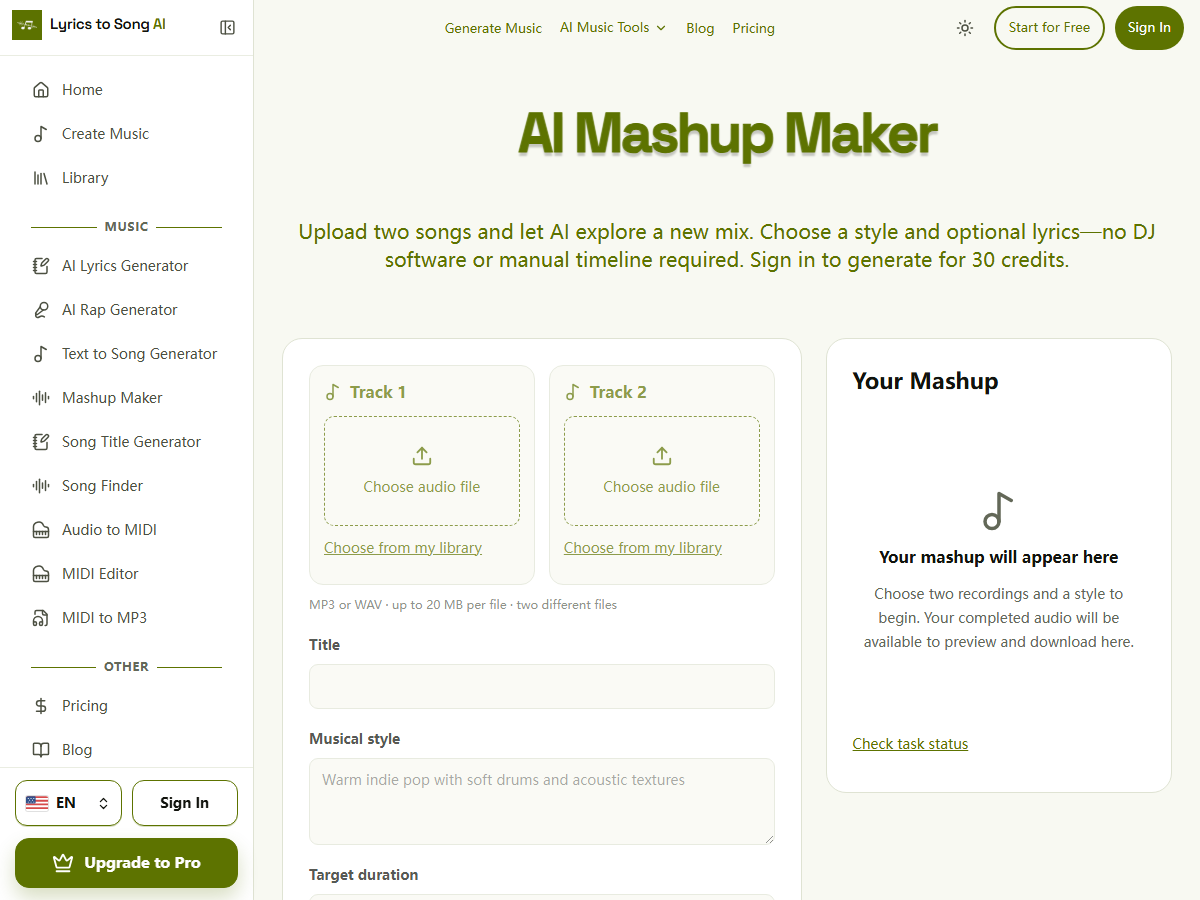
Give the project a title and a focused style, such as “warm acoustic pop with restrained electronic drums.” Choose a 30-, 60-, or 120-second target. Add your own lyrics if you want to supply words to sing; put instrumentation and mood in the style field. Target duration is not an exact output-length guarantee.
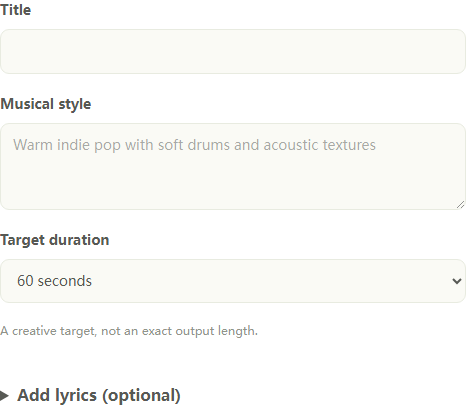
Each generation reserves 30 credits when accepted and charges them after the returned audio is saved for delivery. Confirmed failures release the reservation under the credits’ original expiry rules. Previewing or downloading an existing result does not start another paid generation. Another version is a new 30-credit attempt.
Uploaded input copies expire after 24 hours. Results made only with free credits and without an active paid subscription are kept for 30 days; eligible paid results have no automatic expiry. See pricing and privacy for the wider account and storage terms.
FAQ
What is the best free AI mashup maker?
There is no single verified winner in this review. Use the comparison to choose between stem remixing, automatic vocal-over-beat mixing, and DJ editing. The recommendations reflect published capabilities, not a listening-test ranking.
Can I combine two songs online without signing up?
Mash Lab advertises that workflow. Verify current access on its site. Our own tool requires sign-in before upload and generation, even when you use promotional credits.
Can I put vocals from one song over another beat?
Use a tool with separate vocal and backing roles, or separate stems and arrange them manually. A generative tool may reinterpret the performances instead of preserving the exact original vocals.
Can I make a mashup on my phone?
BandLab documents mobile Splitter access. For browser-based tools, check device support and try your intended workflow before a large project; a desktop feature list alone does not establish mobile performance.
Does a free tool include a free download?
Not always. Check export format, account requirements, and any paid restrictions separately from processing access. The tool sections above distinguish advertised export options where we could verify them.
Is a mashup the same as a remix?
A mashup typically combines elements from multiple songs. A remix typically reworks a song’s production or arrangement. The terms overlap, so describe the result you want rather than relying on the label alone.
Can I publish a mashup on YouTube or TikTok?
Making a mix does not itself clear the recordings, compositions, or lyrics for publication. Check permissions for your intended use. Paying for software or crediting artists does not grant rights to their music. YouTube explains that claimed music can face restrictions in its copyright guidance. Platform rules and the applicable licenses still matter after editing.
Choose your next step
Use a stem or DJ workflow if exact existing performances are the priority. If you want to explore a new direction from two authorized recordings, prepare your first AI mashup. For original words to accompany it, try the AI Lyrics Generator, or read our guide to commercial use of AI songs before planning a release.
On this page