Turn Your Lyrics Into a Song
with AI
Paste your lyrics, choose a musical style, and create songs with AI vocals and music. Listen to both versions from a successful generation and download the ones you want to keep.
Shape your song
Hear what your lyrics can become
Explore these selected audio examples before starting your own song. Your lyrics and settings will produce different results; listen for phrasing, pronunciation and the sound you enjoy.
刚好喜欢你
海底游玩
Burning Inside

Cinematic Climax
Down Here, I Can Breathe

Still Here at 2
그날의 온기
오늘은 너의 날
How to Turn Lyrics Into a Song With AI
Turn your written lyrics into music in four simple steps.
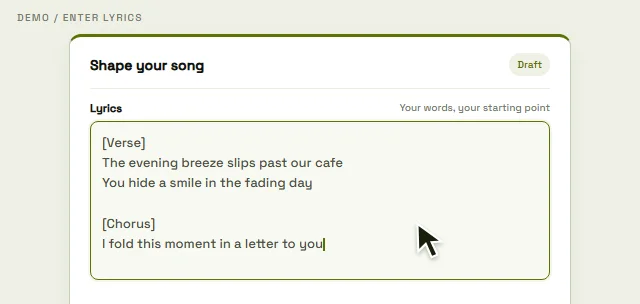
Enter and Structure Your Lyrics
Paste or type your lyrics, then organize them with sections such as Verse, Chorus, and Bridge.
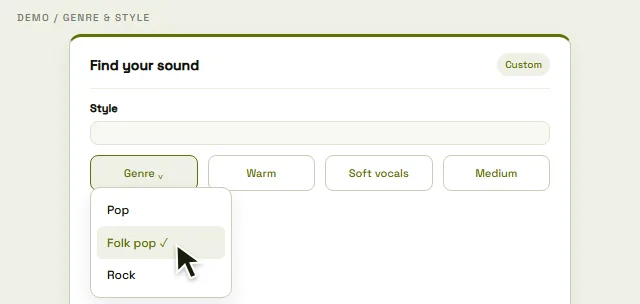
Choose Your Music Style
Set the genre, mood, vocal direction, and other style options to describe how you want your song to sound.
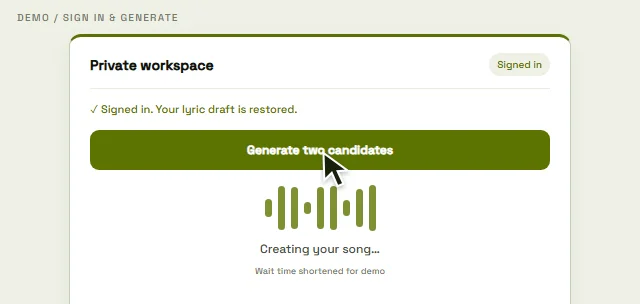
Generate Your Song
AI turns your lyrics and style choices into song candidates with melody, vocals, and instrumentation.
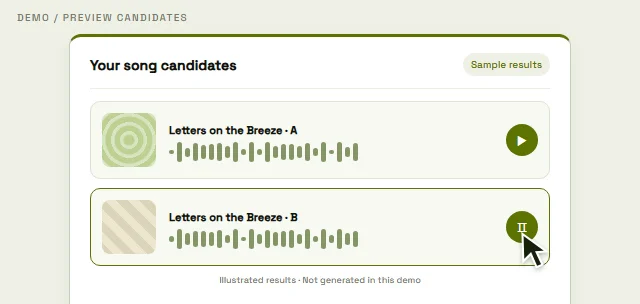
Preview and Download Your Songs
Listen to the generated candidates, compare the versions, and download the ones you want to keep from your private library.
Shape the sound around your lyrics
Start with lyrics you wrote or have permission to use. The generator creates music around your words, without requiring music theory or a recording of your voice. These controls guide the result; they do not guarantee exact notes, timing or word-for-word singing.
Keep your words as the starting point
Use your own lyrics, an authorized AI-written draft or a poem. Review both versions for skipped, repeated or mispronounced words.
Describe the instruments and mood
Try a direction such as warm acoustic guitar and a gentle, reflective mood. Instrument and arrangement descriptions are creative guidance.
Choose a vocal direction
Request a male or female vocal, or choose instrumental for music without singing. This does not clone your voice or select a particular performer.
Explore a different style
Try Pop, Rap, Country, Rock, R&B or another style. Change one preference at a time so you can hear what changed.
Guide the pace and length
Choose a tempo direction and a target of 10–360 seconds. The default is 180 seconds; the finished duration and rhythm can vary.
Compare, revise and try again
A complete standard task delivers two versions. Edit your draft or style before a new generation; each successful new task costs another 30 credits.
Give each lyric section room to sing
Separate your lyrics into phrases, and put musical directions in the style field. Here is the same short draft before and after formatting.
One long paragraph
I watch the last train leave the station and I hold the words I couldn’t say leave a little light for me somewhere only we can see
Clear verses and a chorus
[Verse] I watch the last train leave the station And I hold the words I couldn’t say [Chorus] Leave a little light for me Somewhere only we can see
Use the lyric field for words
The homepage accepts 20–5,000 characters. Section tags help communicate structure; they do not force exact timing.
Give the style a clear direction
For example: acoustic pop, warm guitar, gentle female vocal, slow tempo. This is a suggested starting point, not a tested audio result.
Listen against your original
Check names, repeated choruses and the ending. Reformatting may help, but a new generation can still omit or change words.
Try it free. Know what you can use.
Eligible devices and accounts receive 90 one-time credits: 3 standard generations (6 songs on success) if used only for songs. A successful task saves two different versions for 30 credits. Failed or single-version delivery is not charged. AI lyrics use the same balance at 1 credit per successful task. Free signup credits are unavailable for access from India.
| What matters | Free-credit generation | Paid-credit generation |
|---|---|---|
| Listen and download | Available audio in your private library | Available audio in your private library |
| Commercial use | Non-commercial use | Commercial use; a certificate only with annual-plan funding |
| File storage | 30 days from first delivery without an effective paid subscription | Long-term storage with no automatic expiry |
Swipe the table horizontally to compare free and paid credits.
Storage and licensing are separate. An effective paid subscription also gives free-credit audio long-term storage, but does not change its non-commercial license. Rights follow each generation’s recorded funding; upgrading later does not change old results.
Read the full pricing and storage detailsPricing Plans
Choose your billing period. Credit expiry and file storage are explained separately.
Starter
≈ $0.11 per song · 30 credits per generation: 2 songs from the same lyrics or prompt. Per-song prices assume all credits are used for standard song generation.
Monthly credits expire at the paid period end.
- 1,500 Credits / month
- 50 generations / month, 100 songs if all credits go to standard song generation
- Standard AI Music Generation
- AI Lyrics Generator
- Commercial use with paid credits
- Certificate with annual-funded generation
- Long-term storage
- Private audio downloads
Hobby
≈ $0.10 per song · 30 credits per generation: 2 songs from the same lyrics or prompt. Per-song prices assume all credits are used for standard song generation.
Monthly credits expire at the paid period end.
- 3,750 Credits / month
- 125 generations / month, 250 songs if all credits go to standard song generation
- Standard AI Music Generation
- AI Lyrics Generator
- Commercial use with paid credits
- Certificate with annual-funded generation
- Long-term storage
- Private audio downloads
Professional
≈ $0.08 per song · 30 credits per generation: 2 songs from the same lyrics or prompt. Per-song prices assume all credits are used for standard song generation.
Monthly credits expire at the paid period end.
- 9,000 Credits / month
- 300 generations / month, 600 songs if all credits go to standard song generation
- Standard AI Music Generation
- AI Lyrics Generator
- Commercial use with paid credits
- Certificate with annual-funded generation
- Long-term storage
- Private audio downloads
- No charge if a song fails or only 1 of its 2 versions is delivered
- Refund requests within 14 days, even after partial use (reviewed individually)
- Secure checkout by our payment providers; available payment methods are shown before you pay
- Stop auto-renewal anytime; paid access keeps its original term
Free
- 90 credits once per device and account; no fixed expiry
- Enough for 3 generations (6 songs on success), or use them for lyrics and other tools
- Lyrics: 1 credit · Song generation: 30 credits for 2 songs · No daily rewards
- Private playback and downloads; without a paid subscription, free-credit-only audio lasts 30 days
- Free-credit generations are for non-commercial use
Frequently Asked Questions
About Lyrics to Song AI
How do I turn my lyrics into a song with AI?
Paste lyrics you wrote or have permission to use, choose a style, then continue to your workspace and sign in before generating. A complete standard task delivers two different versions to listen to and download. You do not need music theory or a recording of your voice. Follow the step-by-step guide.
Do I get free credits, and do I need an account?
You can prepare lyrics before signing in, but generation requires an account. Eligible new accounts on a device that has not claimed the trial receive 90 one-time credits, with no credit card required. That is enough for 3 generations (6 songs on success), or you can use them for lyrics and other tools. Changing accounts does not restart the device trial. Free signup credits are unavailable for access from India.
Will AI sing my lyrics exactly as written?
Exact word-for-word singing is not guaranteed. Your submitted lyric draft is kept, but the performance may skip, repeat or mispronounce words. Use clear line breaks and section labels, then listen against the original text. See the troubleshooting guide before trying again.
How long can my lyrics be, and how should I format them?
The homepage accepts 20–5,000 characters, not words; a model may have further limits. Use line breaks and labels such as [Verse], [Chorus] and [Bridge]. A long input does not guarantee that every line will be sung. Read the formatting guide for an example.
Can I edit the lyrics or make another version?
Edit your draft or style and submit a new generation. Each successful new standard task costs another 30 credits and produces two versions. Changing a draft does not edit existing audio. This workflow does not offer precise word replacement in a finished recording or guarantee the same melody on another attempt.
Can I choose the genre, voice, tempo and instruments?
Use genre, mood, vocal and tempo preferences to guide the sound. Male or female vocal direction and an instrumental option are available. Instrument descriptions are guidance, not isolated track controls. Exact notes, BPM, duet roles, voice cloning and an uploaded melody are not supported controls in this workflow.
How long are the songs, and how long does generation take?
In lyrics mode you can request a target of 10–360 seconds, with 180 seconds as the default. The finished duration can differ. Processing and audio saving also take a variable amount of time; follow the task status in your workspace. We do not promise an exact song length or completion time.
Can I listen to and download songs made with gifted credits?
Yes. Available audio generated with free credits can be played and downloaded from your private library after sign-in. You download the file delivered for that result; there is no selectable MP3/WAV conversion in this workflow. Availability follows the file’s storage policy. Check the download and storage details.
How many versions do I get, and what happens if generation fails?
A complete standard task saves two distinct audio versions for 30 credits. If zero or only one deliverable version is saved, the task is not charged; releasing reserved credits can take processing time. A complete result that does not suit your taste is not a technical failure. Choosing to generate again creates a new task.
Can I use my songs commercially, and do I own the copyright?
Free-credit generations are for non-commercial use; paid-credit generations allow commercial use. Only annual-plan funding provides a certificate. Rights follow the funding recorded for that generation, not your current account plan, and a later upgrade does not change older results. Commercial permission does not guarantee exclusive copyright, platform acceptance or rights to someone else’s lyrics. Read the commercial-use guide.
Are my lyrics private, and how long are songs saved?
Generated audio is accessed through your private account, but generation and safety checks involve service providers. Without an effective paid subscription, free-credit-only audio lasts 30 days from first delivery. An effective paid subscription or positive purchased-credit funding gives long-term storage with no automatic expiry. Storage does not change commercial rights. Read the privacy policy.
Can I share my song or use it in a video?
You can use a downloaded file outside the site when its license and your input rights permit it. Check the destination platform’s rules separately. This workflow does not provide a public sharing link, direct distribution to Spotify or a music-video generator. A private playback URL is not a public sharing link.
Can I use poems, AI-written lyrics or other languages?
Yes, when you have the necessary rights to use the text. Organize a poem into phrases before submitting it, and review AI-written text before use. Pronunciation and lyric coverage vary across languages and inputs, so check the whole recording. Try the poem-to-song walkthrough.
What is the difference between Lyrics to Song and Text to Song?
Lyrics to Song starts with the words you want sung. Text to Song can start with a description of an idea and let the generator write the words. If you want to review lyrics first, use the separate AI Lyrics Generator before making music. Explore Text to Song.
Turn Your Lyrics into Songs with AI
Sign in to try song generation. Eligible devices receive 90 credits once, enough for 3 generations (6 songs on success), or use them for lyrics and other tools. Switching accounts does not restart the trial. Free signup credits are unavailable for access from India.