Blog articles
How Do I Make AI Sing My Own Lyrics?
Yes. You can make AI sing your own lyrics by using an AI song generator that supports custom lyrics. Paste the words you wrote, choose a music style and vocal direction, and the AI can create a melody, vocals, and instrumental arrangement around your lyrics.
Can AI Sing Lyrics I Already Wrote?
Yes. With custom lyrics, you supply the words instead of asking the AI to write them. You do not need to replace your lyrics with a generated draft to hear them as a song.
Choose the workflow that matches what you already have:
| Tool | What you provide | What you want back |
|---|---|---|
| AI Lyrics Generator | A topic, story, or writing direction | Written lyrics to review and edit |
| Lyrics to Song Generator | Your own lyrics and a musical direction | A song with melody, vocals, and instrumental accompaniment |
| AI Singing / Vocal Generator | Lyrics plus an existing melody, score, or audio, depending on the tool | A vocal performance for music you already have |
This guide focuses on the second workflow. If you are thinking, “I want an AI singer for my lyrics,” check whether you also need it to compose the music. A text-to-speech voice reads words aloud; a lyrics-to-song generator creates a musical performance around them.
How to Make AI Sing Your Own Lyrics
The basic process is to prepare your words, mark the sections, choose a musical direction, and listen critically to the generated song. Here is how to do it without recording yourself.
Step 1: Prepare Your Lyrics
Start with lyrics you wrote or have permission to use. They can be a finished song, a rough draft, or a poem. Professional songwriting experience is not required.
Keep an untouched copy of your original. Put each singable phrase on its own line, and split unusually long sentences at natural pauses. You do not need to rewrite every line before your first attempt.
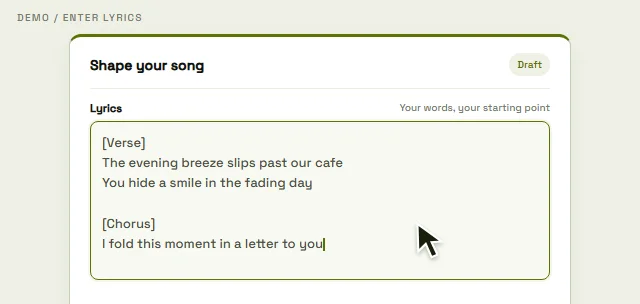
On Lyrics to Song AI, choose Custom and paste your words into the lyrics field. Keep Instrumental off if you want singing. Put musical instructions in the Style field rather than mixing them into lines you want sung.
If you do not yet have enough words, the AI Lyrics Generator can help you develop a draft. It writes text; it is optional when you already have lyrics you want to keep.
Step 2: Add Verse, Chorus, and Bridge Labels
Label sections on separate lines so the model has a clearer indication of the song's structure. A verse develops the story, a chorus returns to the main idea, and a bridge introduces contrast.
Here is an original short example:
[Verse]
I left a light beside the door
Your footsteps aren't here anymore

[Chorus]
Leave a little light for me
Somewhere only we can see

[Bridge]
If morning finds me on my own
I'll learn to make this room a home

[Chorus]
Leave a little light for me
Somewhere only we can see
These labels are directions, not strict musical notation. They can help communicate where sections begin and repeat, but they do not guarantee a specific melody, section length, or delivery. Add a bridge only if the song needs one.
Step 3: Choose a Music Style
Choose a genre, mood, and tempo that suit the words. Genre suggests the musical vocabulary and instrumentation. Mood describes the emotional direction. Tempo sets the intended pace.
Pop, Rock, R&B, Rap, Acoustic, and Electronic are useful starting points. For a reflective lyric, try a direction such as “acoustic pop, wistful mood, gentle guitar, medium tempo.” For a more urgent lyric, try “energetic rock, driving drums, fast tempo.”
Use the available genre, mood, and slow / medium / fast tempo controls, then clarify the sound in Style. These are generation directions, not exact BPM or arrangement guarantees. Avoid combining many contradictory styles on the first attempt.
For rhythm-focused verses, the AI Rap Generator offers a rap-oriented starting point with your own lyrics. Listen for syllables landing naturally against the beat, rather than judging the result only by whether the words rhyme.
Step 4: Choose a Vocal Direction
Describe the kind of delivery that fits the lyric: soft and intimate, emotional, powerful, or energetic. You can use the available Voice choices and vocal gender setting, then add a short performance direction in Style.
For example, “soft female vocal, restrained verse, more energetic chorus” communicates a direction. It does not select a specific real singer or guarantee that every instruction will be followed.
A duet is a different request from a solo vocal. Do not assume a generator offers separate singers, assigned lines, or reliable duet controls just because it accepts the word “duet.” This tutorial uses the available solo vocal directions rather than promising those controls.
Step 5: Generate and Listen
Review the lyrics, settings, rights confirmation, and displayed credit requirements. On this site, the homepage passes your draft to the private creation workspace; sign in and submit the generation there. Preparing a draft is separate from starting a generation, and generating again is a new request with its own credit requirements.
The AI can create a melody for the words, a vocal performance, instrumental accompaniment, and an arrangement that brings the sections together.
Listen once for the overall song, then again while following your written lyrics. Check whether words are clear, lines are rushed, the chorus is recognizable, and any words are missing or repeated. If something is wrong, adjust one thing—such as line breaks or style—and generate another version. A successful audio file still needs a listening check.
How to Format Lyrics for Better AI Singing
Clear line breaks and section labels make your intent easier to communicate. Start by changing the layout before changing the words themselves.
Before: one long block
I watch the last train leave the station and I hold the words I couldn't say leave a little light for me somewhere only we can seeBetter formatting: the same words, separated into phrases
[Verse]
I watch the last train leave the station
And I hold the words I couldn't say

[Chorus]
Leave a little light for me
Somewhere only we can see
The second version makes the section boundary and intended pauses clearer. It does not force a particular rhythm or guarantee a better output every time.
- Use
[Verse],[Chorus], and[Bridge]where those sections actually belong. - Break long lines at a natural phrase boundary. There is no universal ideal character count for a sung line.
- Repeat a chorus you want to return, instead of relying only on an instruction such as “repeat that part.”
- Read your lines aloud to notice awkward clusters of syllables and unnatural stresses. You do not have to sing or record them.
- Keep punctuation simple. Excessive ellipses, nested brackets, and instructions inside a lyric line can make your intent harder to interpret.
- Preserve the meaning and voice of your original. Do not remove its distinctive details just to make every line the same length.
Can AI Sing My Lyrics Word for Word?
Custom lyrics give the generator the words to work from, but word-for-word accuracy is not guaranteed. Generative music systems can mispronounce a word, repeat a phrase, omit a line, or change how sections are delivered.
To improve the chances of keeping your wording, separate sections clearly, shorten very long lines where necessary, and use consistent labels. Check difficult names and phrases carefully when you listen. If a line is wrong, adjust its formatting or pronunciation direction and generate again; another attempt may help, but is not a guarantee.
Keep the original lyric beside the audio and check the whole song, including repeated choruses and the ending. If exact wording is essential, a result with an omission is not ready to use. A workflow with manual vocal editing or a recorded performance may give you more control.
Can AI Sing My Lyrics Without Me Recording My Voice?
Yes. A text-based lyrics-to-song workflow can generate singing from your written words without a microphone recording, a recording studio, or hiring a singer.
You choose a vocal direction; you do not need to demonstrate the melody first. The generated voice is not automatically your own voice. Voice cloning or reproducing an existing vocal performance is a separate capability and is not part of this workflow.
What If I Already Have a Melody?
If you only have lyrics, a lyrics-to-song generator can invent music for them. If you already have lyrics and a melody you need to keep, look for a workflow that explicitly accepts a melody reference, a score, MIDI, or suitable audio input. A style description alone does not encode your exact notes.
For a recording or hummed idea, Audio to MIDI can help turn detected notes into a MIDI draft for inspection. Clear, simple audio is a more useful starting point than a dense mix. The result needs checking; MIDI represents note instructions, not the original voice or recording. Standard conversion runs in the browser after sign-in.
Once you have a MIDI draft, the MIDI Editor lets you inspect and adjust notes. Keep the original file: the editor does not preserve every MIDI event. Note editing and basic synth preview do not generate a sung vocal from your lyrics.
These are separate steps for working on existing musical ideas. Do not assume converting audio to MIDI sends your melody into the site's song generator or guarantees the generated song will follow it. If the melody must stay fixed, choose a singing tool whose supported inputs give you that control.
Can I Turn a Poem Into a Song With AI?
Yes. A poem can serve as custom lyrics. Start with its existing wording, break long lines into singable phrases, and group related lines into verses.
If one phrase carries the central feeling, you can repeat it as a chorus or hook. You do not have to force a rhyme or add a chorus if that damages the poem. Listen to how the music treats pauses, emphasis, and the ending before deciding what to revise.
Frequently Asked Questions
Can AI sing lyrics I wrote?
Yes. Use a song generator that accepts custom lyrics, enter your own words, and choose a musical direction. You do not need to ask a lyrics generator to replace your writing first.
Do I need to sing or record my own voice?
No. A text-based lyrics-to-song generator can create the vocal performance from your lyrics. Recording is relevant to other workflows, such as supplying an existing melody or a voice reference.
Can AI create a melody from lyrics?
Yes. A lyrics-to-song generator can compose a melody and accompaniment around the words you supply. You can guide the style, but a text description does not specify every note.
Can AI sing my lyrics word for word?
It can use your supplied words, but exact delivery is not guaranteed. Listen for pronunciation errors, repetition, or omissions, and revise or regenerate when needed.
Do my lyrics need to rhyme?
No. Unrhymed lyrics can still become a song. Natural phrasing, clear meaning, and a rhythm that works when sung matter more than forcing an end rhyme into every line.
Can I turn a poem into a song?
Yes. Use the poem as your lyric input, adjust line breaks, and add section labels if helpful. Repeating a central phrase can create a hook, but keep changes faithful to the poem.
Start With Your Own Lyrics
You already wrote the words. The next step is turning them into music.
If you plan to use a generated result in a commercial project, review the site's commercial use and licensing information in the Terms and the terms that apply to your result before using it.
Turn your lyrics into a song