Which AI Could Best Sing the Lyrics I’ve Written?
Compare custom-lyrics workflows in Lyrics to Song AI, Suno and Udio, then use a practical listening checklist to choose a performance that fits your words.
For a workflow built around pasting your lyrics, choosing a musical direction and comparing two generated versions, Lyrics to Song AI is an option to try. Custom-lyrics support tells you where to start; listening to the result tells you whether the performance works for your song.
Editorial disclosure: This article is published by Lyrics to Song AI. We compare documented workflows and suggest a listening method; we have not run a controlled audio comparison or established a winning singer. The linked competitor workflow documentation was checked on November 2, 2026. Availability and policies can change.
Which AI tools can sing lyrics I already wrote?
| Tool | Custom-lyrics starting point | Why consider it? |
|---|---|---|
| Lyrics to Song AI | Paste your lyrics, set musical preferences and sign in to generate | A lyrics-first workflow with two distinct versions per completed standard task |
| Suno | Choose Custom on the Create page and enter your lyrics | A documented route for supplying your own words directly |
| Udio | Choose Custom under Write Your Lyrics, then paste into the Lyrics Editor | Another documented custom-lyrics workflow for exploring an interpretation |
Suno’s custom-lyrics documentation and Udio’s own-lyrics guide confirm those input steps. They do not establish comparative vocal quality. Check each service’s current access, download and usage conditions before spending credits; this table does not promise equivalent plans or exports.
When should I try Lyrics to Song AI?
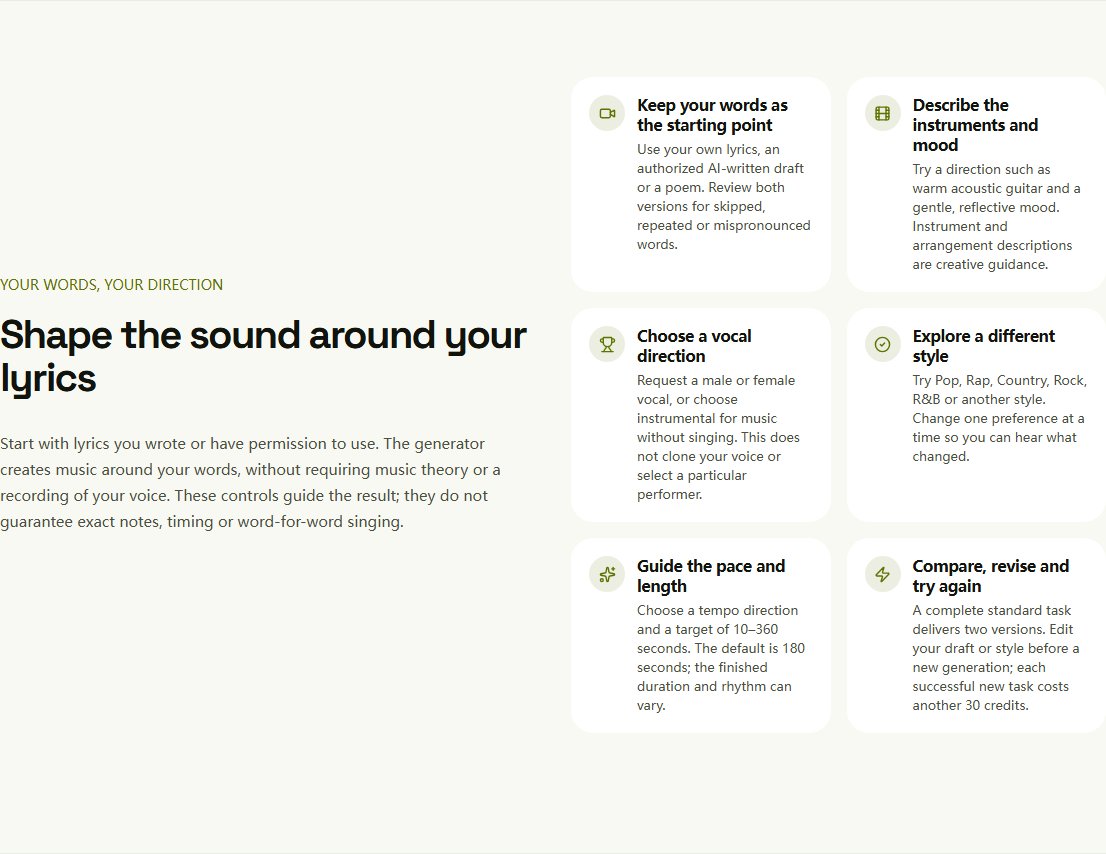
Consider it when you have words ready and want vocals, a newly generated melody and accompaniment around them. You can prepare a draft before signing in; generation itself requires an account. The current interface offers genre, mood, vocal and tempo guidance, plus a target duration in lyrics mode.
A completed standard task delivers two distinct versions for playback and download in your private library. The site uses Suno V6-family models through KIE.ai; evaluate it as a service and workflow, rather than as an independently developed singing model or an independent model-quality benchmark against Suno.
These preferences guide generation. They do not guarantee exact notes, duration, pronunciation or word-for-word singing.
What makes an AI singer best for my lyrics?
A pleasant voice is only one part of a usable result. Before listening, mark the names, messages and lines you must keep. Then compare five things:
| What to assess | What to listen for |
|---|---|
| Lyric accuracy | Missing lines, changed words or unwanted repetition |
| Pronunciation | Clear names, unusual words and important phrases |
| Natural phrasing | Pauses, breathing space and emphasis that support the meaning |
| Emotional fit | A delivery that matches the feeling of the lyric |
| Musical fit | A melody and arrangement that leave room for the words |
For a personal gift, an expressive chorus may matter most. For a song built around someone’s name, a mispronunciation may make an otherwise beautiful version unusable. Decide those requirements before choosing your favourite voice.
How do I compare the tools fairly?
Use the same short verse and chorus that you own or have permission to use, with the same broad musical direction. For example:
Acoustic pop, gentle female vocal, warm guitar, reflective verses and a hopeful chorus.
This is a suggested test prompt, not a tested result. Set a budget and attempt limit before starting. Record the number of recordings each task produces, since a task is not the same unit across services. Keep every result rather than comparing one tool’s best of ten with another’s first try.
Listen twice: first for musical appeal, then while reading your original. You can copy this blank listening log into your notes; it contains no measured scores:
| Record for each version | Your notes |
|---|---|
| Tool, settings and attempt number | Fill in after generation |
| Missing or changed words, with timestamps | Fill in while following the lyric |
| Pronunciation or phrasing problems | Name the exact phrase |
| Best moment and remaining problem | Describe what you would keep or fix |
| Credits or money spent; download available? | Check the actual account and result |
| Keep this version? | Yes / no, with your reason |
If both versions miss the same long line, try simplifying that line before buying many more attempts. Our skipped or repeated lyrics guide gives a more detailed troubleshooting method. For a broader feature and policy comparison, read lyrics-to-song tools compared.
How should I prepare my lyrics?
Keep an untouched copy of your writing. In the generation draft:
- Put each intended phrase on its own line.
- Separate sections with labels such as
[Verse]and[Chorus]. - Put musical directions in the style field, rather than among words you want sung.
- Keep Instrumental off when you want vocals on Lyrics to Song AI.
- Check the complete recording against your original before choosing a version.
Section labels suggest structure; they do not force exact timing. If you need the full workflow, follow the step-by-step guide to making AI sing your lyrics.
If the words themselves feel crowded or the stresses obscure the meaning, use the lyric-writing guide to revise the phrasing. That is a writing decision you can make before paying for another performance.
Only have a theme rather than a complete lyric? You can draft lyrics from your idea, review the text and edit it in your own voice before making music. This creates a new lyric draft, not a precise edit to an existing recording. If you already have words you want to keep, skip this step and use them directly.
What if I already have a melody?
Custom-lyrics support alone is insufficient. Choose a workflow that explicitly accepts and follows the musical input you have, such as a recording, score or MIDI, and check how closely it can preserve your notes.
Lyrics to Song AI’s standard song workflow does not offer exact melody input or voice cloning. “Slow piano ballad” describes a style; it does not specify your tune. The site’s separate MIDI tools do not turn this lyrics workflow into MIDI-to-vocal generation.
Can I try it before paying?
Lyrics to Song AI offers eligible devices and accounts 90 one-time credits, shared with the lyrics generator. If used only for songs, this covers up to three standard generations. A completed standard task costs 30 credits for two distinct versions. Failed or partial delivery is not charged; trying again after a completed task is a new generation.
Free-credit generations are for non-commercial use. Without an active paid subscription, files made using only free credits are saved for 30 days from first delivery, so download the versions you want to keep while they are available. Long-term storage and commercial permission are separate: storage does not itself grant commercial rights, and a later upgrade does not retroactively change a free result’s license.
Check current pricing and conditions and the commercial-use guide before generating for a project. Verify other providers’ trial and download rules separately.
Which should I choose first?
Try Lyrics to Song AI if preparing your own lyric draft and comparing two versions fits your task. Suno and Udio provide additional documented custom-lyrics starting points. Choose based on the complete recording that handles your actual words well, within your budget and output requirements.
You have already written the words. Start with a short verse and chorus, listen against the original, and keep the performance that expresses the message you intended.
Try your own lyricsOn this page